 Keyboard Builder
Keyboard Builder
Build a toy mechanical keyboard and play it
The child opens a keyboard kit, snaps a switch into every socket, presses the keycaps on, plugs in the cable and decorates the case with stickers. Then the finished keyboard is played with all ten fingers: each of the six switch types has its own sound, the keys glow, and four mini games pay stars that unlock more parts.
Version 1.0 · 4.1 MB · Android 8.0+
- Plays offline
- No ads
- No purchases
- No account
- No permissions
- 20 languages
About the game
Keyboard Builder is a quiet building toy for children who like to put things together and listen to them click. There is no story and no hurry. A keyboard can be built in a few minutes with the magic wand or key by key with care, and the child can keep three keyboards at once.
The keys on the screen are for sound and light only. The game has no text field, nothing the child presses is stored or sent, and the letters on the caps can be swapped for symbols, pixel pictures or blank caps.
What is inside
Your keyboard and four things to do with it
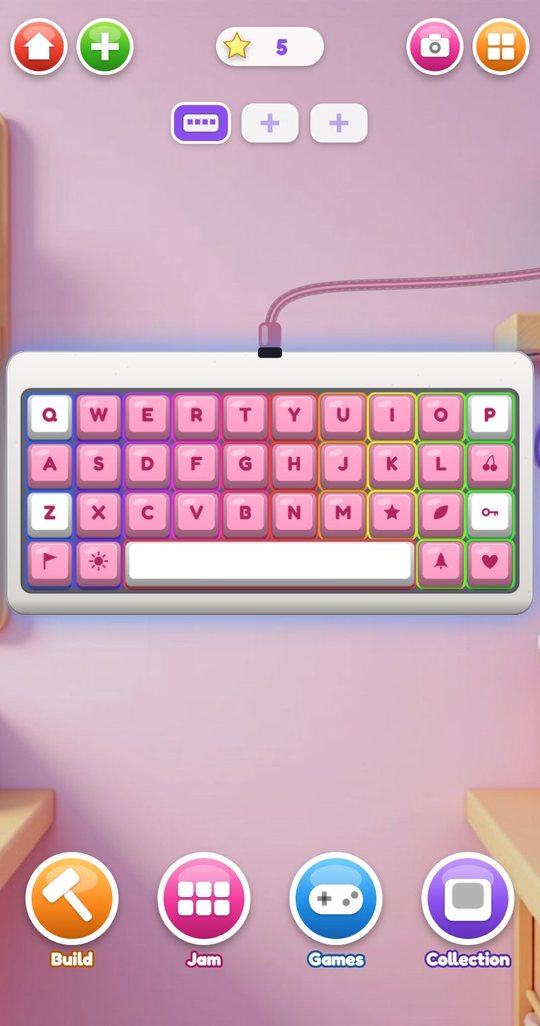
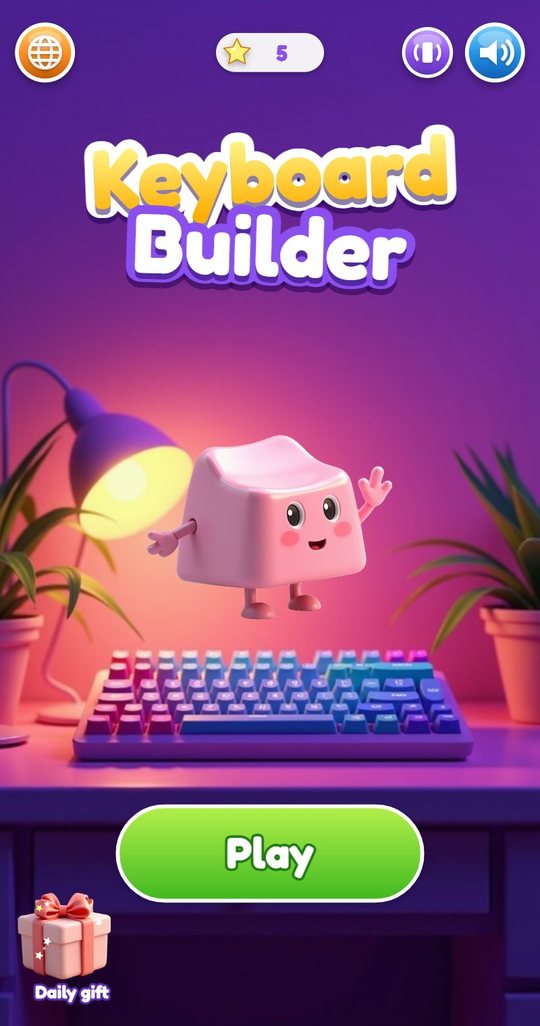
The home screen shows the current keyboard on the desk and four round buttons: Build, Jam, Games and Collection. Three slots at the top hold three different keyboards, and the plus button starts a new one, which arrives as a kit in a cardboard box for the child to open.
The star counter at the top is the only currency in the game. The child starts with 5 stars and earns more by playing.
Case and switches
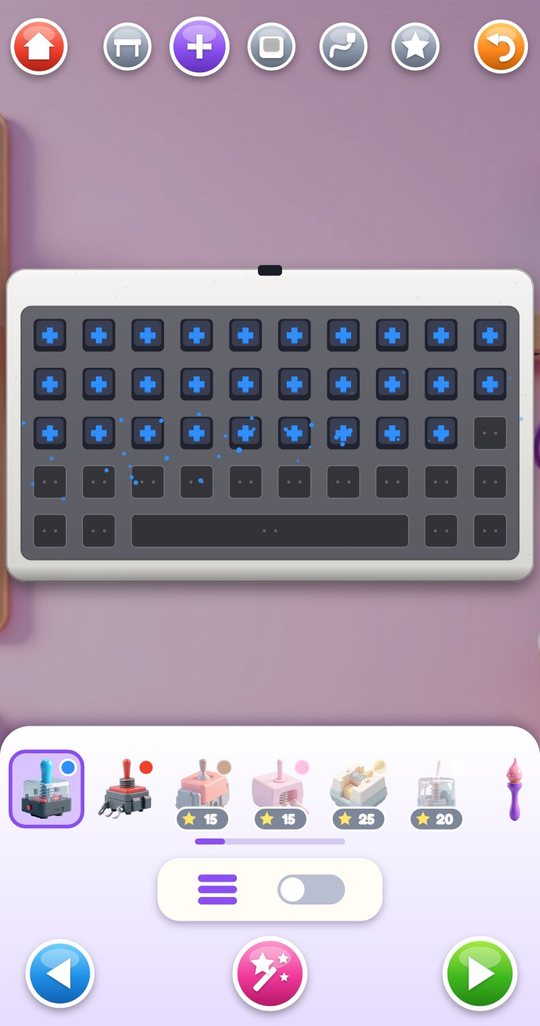
Building has five steps, shown as icons along the top: case, switches, keycaps, cable and stickers. At the first step the child picks one of 12 cases and one of three sizes: Mini with 35 keys, Classic with 45 or Gamer with 58.
At the second step every empty socket shows a plus sign. The child chooses a switch in the tray and taps or slides across the sockets, and a switch snaps into each with its own sound. Clicky and Linear switches are free; Tactile, Silent, Thock and Clack are unlocked with stars. Different switches can be mixed on one board. A brush lubes single switches for a softer sound, a puller takes a switch out again, and a foam toggle makes the whole board sound deeper.
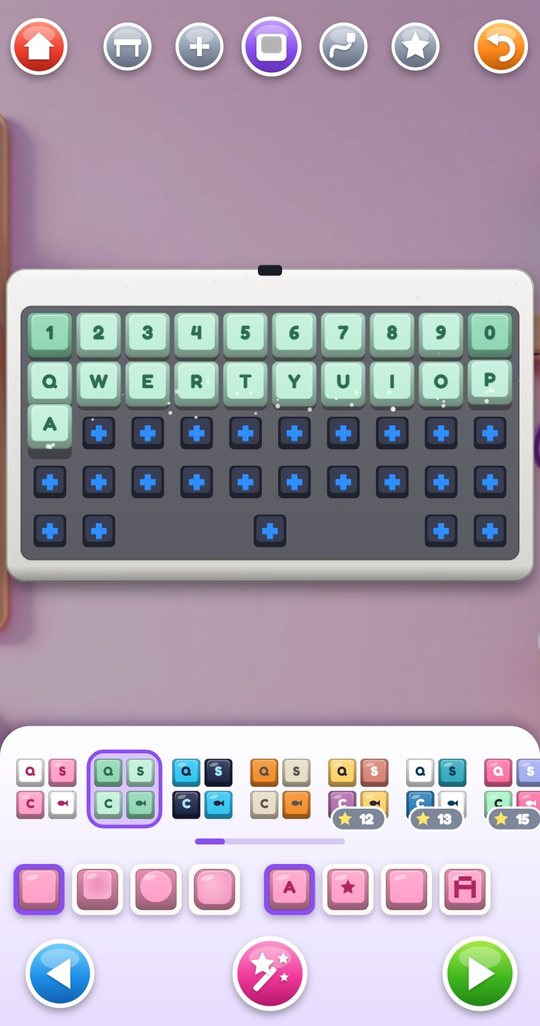
Keycaps in 24 colour sets
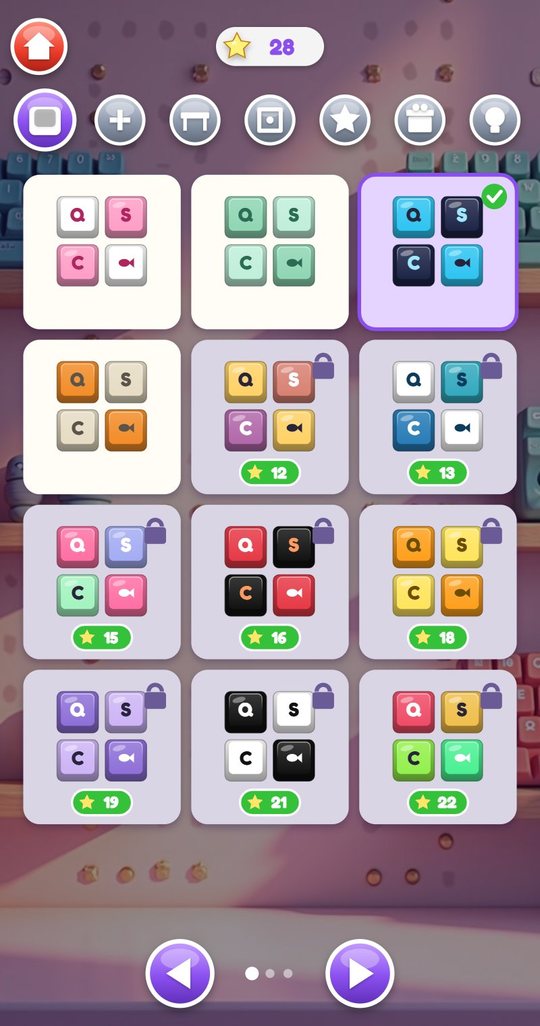
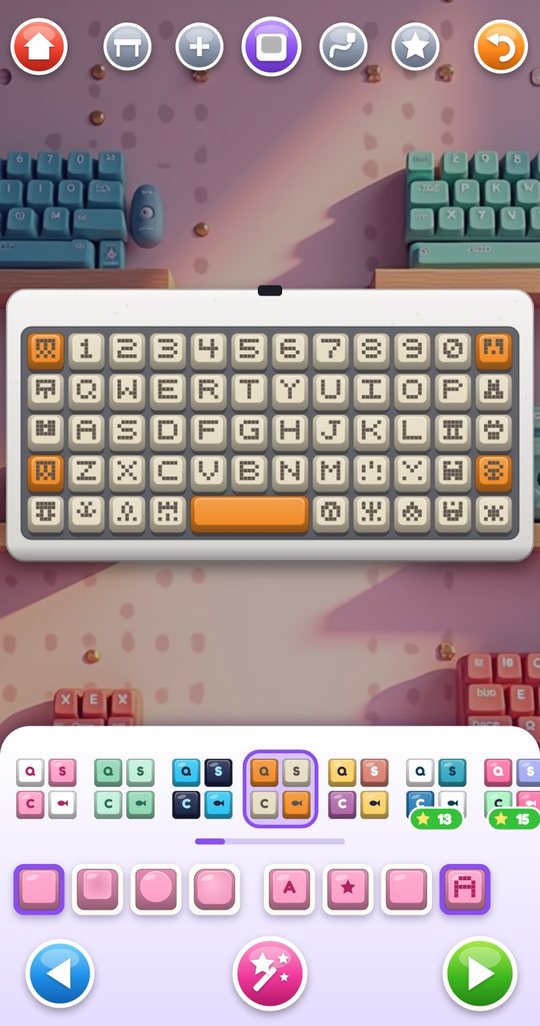
At the third step the caps go on. The tray holds 24 ready keycap sets, from pink and white through dark blue with cyan to rainbow rows, and a custom set that the child mixes from three colours. Four sets are free and the rest cost between 12 and 40 stars.
Under the tray are two rows of four buttons. The first changes the shape of all caps: flat, sculpted, round-topped or pillow. The second changes what is printed on them: letters, symbols, nothing, or pixel characters. Ten artisan caps, such as a dragon, a cat and a cupcake, can replace single keys, and the child can paint one cap dot by dot on an 8 by 8 grid.
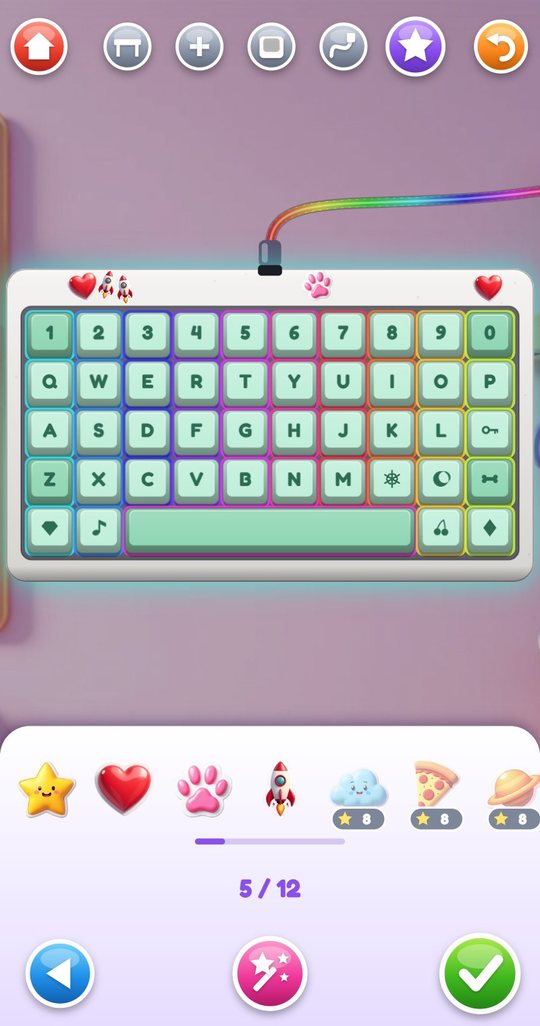
Cable and stickers
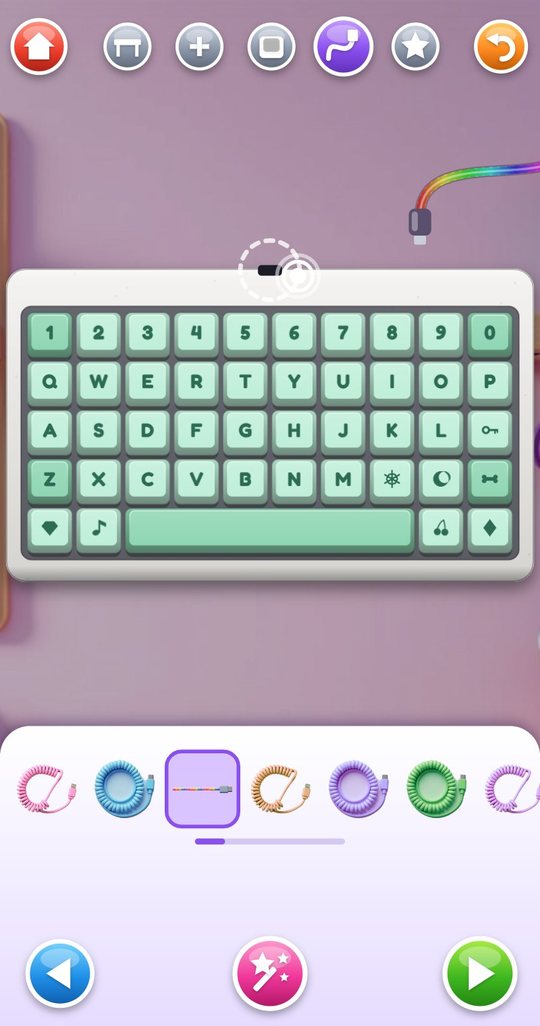
At the fourth step the child picks one of 8 cables, coiled or straight, and drags the plug to the socket on the case. When it clicks in, the lights under the keys come on. The last step is stickers: a star, a heart, a paw, a rocket and four more that are dragged onto the case, up to 12 on one board.
The pink wand at the bottom fills in everything that is still missing at the current step, and the orange arrow at the top undoes the last action. The green tick finishes the build and opens Jam.
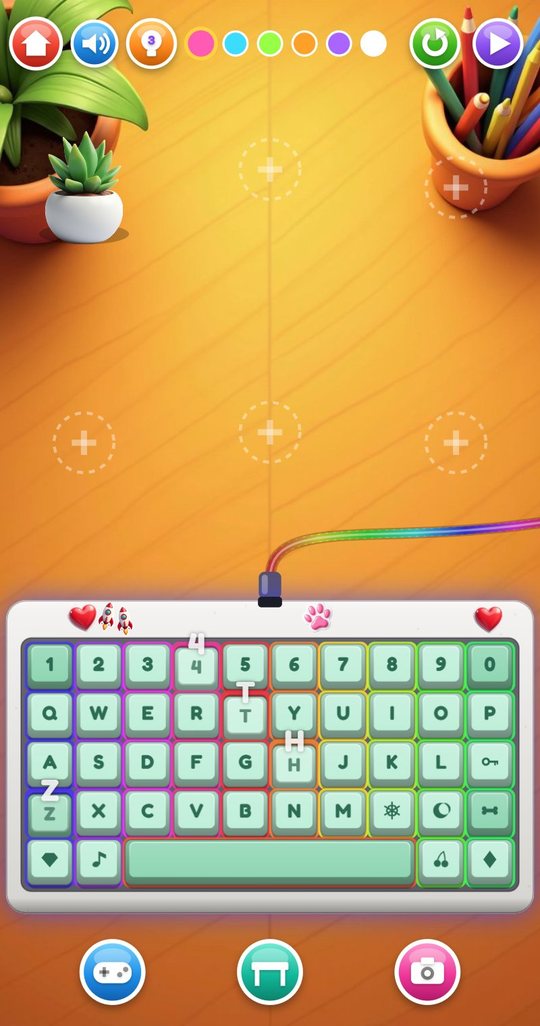
Jam: play it with ten fingers
In Jam the keyboard sits on a desk and every key can be pressed. Many fingers work at once and a finger can slide from key to key. Each press plays the sound of that key's switch, shaped by the case material and the foam, and the legend floats up from the cap. The phone gives a short tap of vibration with each press; a button on the title screen turns that off.
Buttons at the top switch between six light modes and six light colours. A replay button plays back the last 8 seconds, and a play button lets the keyboard type by itself. The desk can be changed, and six spots on it take decorations such as a plant, a mug or a lava lamp. A camera button opens the photo booth.
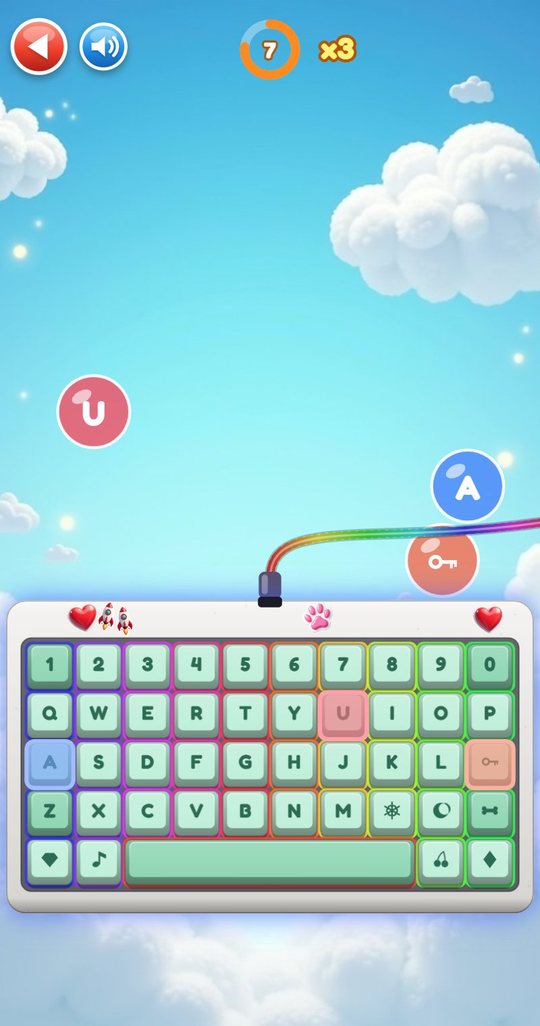
Four mini games on your own keyboard
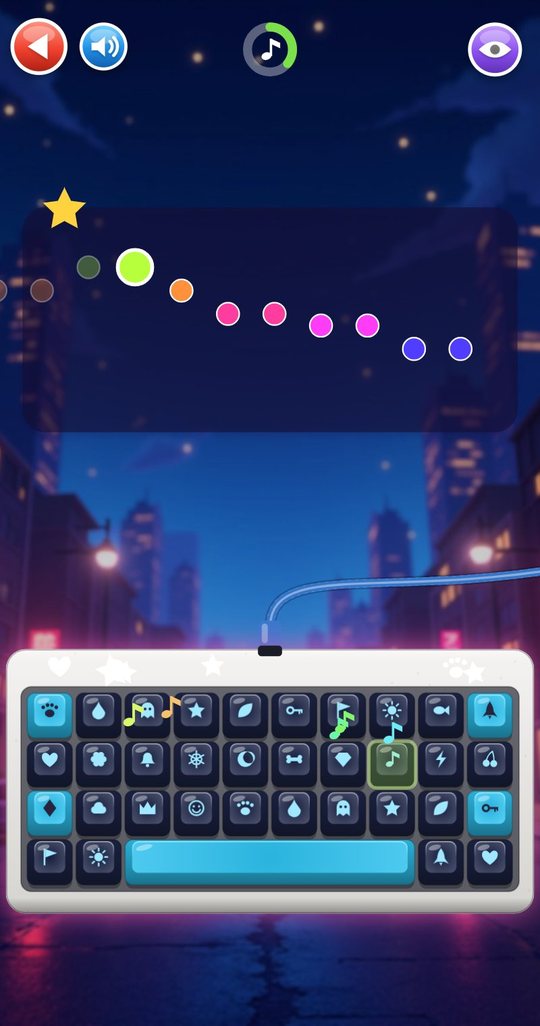
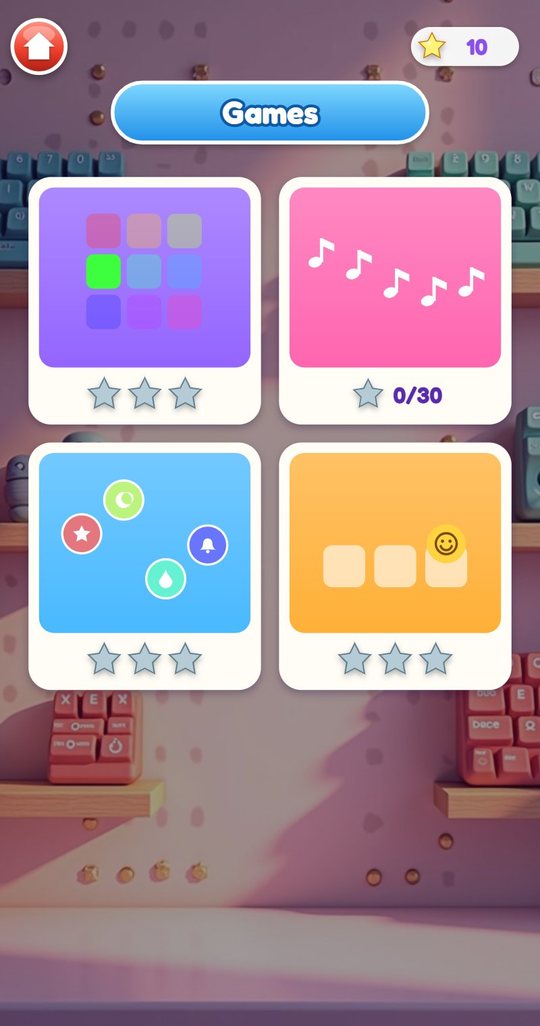
The games are played on the keyboard the child built. In the pattern game nine keys light up in a sequence that the child repeats, over six rounds that grow from three to seven steps. In the melody game the child follows highlighted keys through one of ten tunes. In the bubble game bubbles with letters and symbols float over the board for 45 seconds and the child presses the matching key. In the fourth game a smiley pops up on random keys for 40 seconds and the child taps it.
Each game gives up to three stars, plus one bonus star the first time it is completed.
Collection
The Collection has seven tabs: keycap sets, switches, cases, desks, stickers, artisan caps and desk decorations. Locked items show their price in stars; tapping one with enough stars asks for a confirmation before spending. A daily gift on the title screen hands out one locked item for free each day.
How to play
- Tap Play, then the plus button, and open the box with the new kit.
- Pick a case and a size: Mini, Classic or Gamer.
- Choose a switch and tap or slide over the sockets to snap switches in.
- Choose a keycap set, a cap shape and a legend style, and press the caps on.
- Pick a cable, drag the plug to the socket and add stickers.
- Tap the green tick and play the keyboard in Jam; try the light modes.
- Earn stars in the four mini games and unlock new parts in the Collection.
Screenshots
Full specification
| Slots | 3 keyboards kept at once; a fourth replaces the current one after a confirmation |
|---|---|
| Sizes (3) | Mini with 35 keys, Classic with 45 keys, Gamer with 58 keys |
| New keyboard | Arrives as a kit in a box that the child opens before building |
| Build steps (5) | Case and size, switches, keycaps, cable, stickers |
| Build helpers | Magic wand that fills in the current step, undo, switch puller, keycap puller |
| Free | White, sky blue, lemon yellow |
|---|---|
| 10 stars each | Mint, walnut wood, lilac, black |
| 15 stars each | Pink aluminium, marble, carbon |
| 20 stars each | Clear crystal, gold |
| Effect on sound | The material changes the sound: wood is darker and fuller, aluminium, crystal and gold add a ring, marble and carbon are shorter |
| Clicky | Blue, free; a sharp double click |
|---|---|
| Linear | Red, free; a smooth thump without a click |
| Tactile | Brown, 15 stars; a soft bump |
| Silent | Pink, 15 stars; very quiet |
| Thock | Cream, 25 stars; deep and hollow |
| Clack | White, 20 stars; a bright knock |
| Lube brush | Softens the sound of single switches |
| Foam | A toggle for the whole board; makes the sound deeper |
| Mixing | Any switch can go in any socket; long keys add a rattle of their own |
| Sets (24) | Bubblegum, Mint Cream, Midnight and Retro Beige are free; Sunset, Ocean Wave, Candy Mix, Lava, Lemon Pop, Lavender Dream, Panda, Rainbow Rows, Jungle, Galaxy, Strawberry Milk, Gold Rush, Frost, Pumpkin, Cotton Cloud, Neon Arcade, Coral Reef, Chocolate Mint, Sakura and Pixel Hero cost from 12 to 40 stars |
|---|---|
| Finishes | Gloss, matte, translucent, metal, sparkle, depending on the set |
| Custom set | The child's own set of three colours chosen from 12 swatches, 50 stars |
| Cap shapes (4) | Flat, sculpted, round-topped, pillow |
| Legends (4) | Letters, symbols, blank, pixel |
| Artisan caps (10) | Dragon, cat, mushroom, crystal, cupcake, robot, pumpkin, ice cream, ladybug, octopus; 30 stars each |
| Paint your own cap | Free; an 8 by 8 pixel grid with 12 colours and an eraser |
| Seasonal pixel caps (4) | Pumpkin in October and November, snowflake from December to February, flower from March to May, sun from June to September; given by the daily gift only |
| Cables (8) | Pink, blue and rainbow cables and five more colour variants, all free; the plug is dragged to the socket |
|---|---|
| Stickers (8) | Star, heart, paw and rocket are free; cloud, pizza, planet and flower cost 8 stars each; up to 12 stickers on a board |
| Desks (8) | Wood and pastel are free; neon, space, cozy, garden, candy and ocean cost 15 stars each |
| Desk decorations (6) | Plant is free; mug, lamp, bunny, headphones and lava lamp cost 12 stars each; six spots on the desk |
| Playing | Multi-touch: every finger presses its own key, and a sliding finger glides from key to key |
|---|---|
| Light modes (6) | Steady colour, breathing, rainbow wave, ripples from pressed keys, flash on press, lights off; lights work once the cable is plugged in |
| Light colours (6) | Pink, cyan, green, orange, purple, white |
| Replay | Plays back the last 8 seconds; kept in memory only and dropped when the screen is left |
| Auto-play | The keyboard types by itself |
| Other buttons | Change desk, place decorations, open games, open the photo booth, sound on/off |
| Pattern game | Nine keys light up in a sequence to repeat; six rounds of 3, 3, 4, 5, 6 and 7 steps; a mistake replays the sequence; 3 stars for all six rounds, 2 for five, 1 for three |
|---|---|
| Melody game | Follow the highlighted keys through a tune; an eye button plays a demonstration; 3 stars with up to two wrong keys, 2 with up to six, otherwise 1 |
| Melodies (10) | Twinkle Twinkle, Ode to Joy, Jingle Bells, Row Row Row Your Boat, Mary Had a Little Lamb, Frere Jacques, When the Saints, and three original tunes: Cap Dance, Switch Groove and Glow Waltz |
| Bubble game | 45 seconds; press the key shown in each floating bubble; 3 stars for 35 bubbles, 2 for 25, 1 for 15 |
| Smiley game | 40 seconds; tap the key where the smiley pops up; 3 stars for 28 hits, 2 for 20, 1 for 12 |
| Bonus | 1 extra star the first time each game, and each melody, is completed; the highest result is shown on the games screen |
| Starting stars | 5 |
|---|---|
| Earned from | Mini games and one-time goals |
| One-time goals | First finished keyboard, 3 stars; four different switch types on one board, 3 stars; six stickers on one board, 2 stars; 100 key presses, 2 stars; 1,000 key presses, 5 stars |
| Spent on | Keycap sets, switches, cases, desks, stickers, artisan caps, desk decorations; each purchase is confirmed |
| Daily gift | Once a day: one random locked item, or the seasonal pixel cap while its months last; 3 stars when everything is owned |
| Collection tabs (7) | Keycap sets, switches, cases, desks, stickers, artisan caps, desk decorations |
|---|---|
| Photo booth | A picture of the keyboard on its desk with one of 8 frames: stars, hearts, bolts, dots, clouds, neon, keycaps, plain |
| Album | The newest 12 photos; a photo can be opened large and deleted |
| Title screen buttons | Language, vibration on/off, sound on/off, daily gift |
|---|---|
| Saved on the device only | Stars, owned items, the three keyboards, the painted cap, the custom set colours, photos, top game results, a count of key presses, settings |
| Not saved | Which keys were pressed; the game has no text field and does not read a hardware keyboard |
| Sound | All synthesised: six switch voices changed by case material, foam and lube, effects, game tones and a soft background loop |
| Vibration | A short tap on key presses, using the phone's standard key feedback |
| Orientation | Portrait |
| Version | 1.0 |
|---|---|
| File | KeyboardBuilder-1.0.apk, 4.1 MB |
| Android package | com.keyboardbuilder.kids |
| Requires | Android 8.0 or newer, phone or tablet, portrait |
| Internet | Not used. The game works fully offline |
| Android permissions | None |
| Ads and purchases | None |
| Accounts and data | No account. Nothing is collected or sent; progress is saved on the device only |
| Interface languages (20) | English, Español, Português, Français, Deutsch, Italiano, Nederlands, Polski, Русский, Українська, Türkçe, Bahasa Indonesia, Tiếng Việt, हिन्दी, বাংলা, العربية, ไทย, 中文, 日本語, 한국어 |
| Price | Free |
For parents
Your child assembles a toy keyboard in five steps and then plays with it. Building is tapping and sliding: switches snap into sockets, caps press onto switches, a plug is dragged to its socket. Afterwards the keyboard becomes an instrument of clicks and lights, and the base for four short games.
The game is written for ages 6 to 12. Younger children can build with the magic wand, which fills in the current step for them. The mini games are short, 40 to 45 seconds or six rounds, and have no penalty for a poor result; a round with too few points gives no stars and can be replayed at once. There are no timers in building or in Jam.
A word about the keys, since this is a keyboard: nothing typed is recorded. The game has no text field, does not listen to a hardware keyboard, and saves only a number of presses for two star goals. The 8-second replay stays in memory and is gone when the child leaves the screen.
Keyboard Builder works fully offline and requests no Android permissions. It has no ads, no purchases, no account, no chat and no links out, and it collects nothing. Stars are earned only by playing. Progress and photos, which are pictures of the game screen, stay in the game's storage on the device. The sound button and the vibration button are on the title screen.
Questions and answers
What age is Keyboard Builder for?
It is made for ages 6 to 12. A younger child can still build a keyboard with the magic wand and enjoy pressing the keys; the pattern and melody games suit school-age children better.
Does the game record what my child types?
No. The on-screen keys only make sounds and light. There is no text field, nothing pressed is stored or sent, and the game does not read a hardware keyboard. Only a count of presses is saved, for two star goals.
Does it work without the internet?
Yes. The game is fully offline, makes no network calls and requests no permissions. There are no ads and no purchases.
How are new parts unlocked?
With stars. Stars come from the four mini games, from five one-time goals and from nowhere else; the daily gift also hands out one locked item a day. Nothing can be bought with money.
Does my child need to read or know the letters?
No. Everything is chosen by pictures. In the games the key to press is highlighted on the board, and the caps can show symbols or pixel pictures instead of letters.
Is progress saved?
Yes, on the device: stars, unlocked parts, three keyboards, the painted cap and the newest 12 photos. Uninstalling the app or clearing its data removes them.
Can the sound and vibration be turned off?
Yes. The title screen has a sound button and a vibration button, and the sound button is also in Jam and in the games. The Silent switch is a quiet choice for building, too.
Download and install
Open the downloaded file on your Android device. If prompted, allow installation from the browser or file manager, install the game, then switch that permission off again.
The game itself is available in 20 languages and picks yours automatically.
Original filename: KeyboardBuilder-1.0.apk · 4.1 MB · SHA-256:
efc34a59af95433f7173fe51d4532fd925c9d86482e63a50a8d433df31c9c2bf Dentist Game
 Call Santa
 Spooky Tales
 Toy Hospital
 Unbox Surprise
 Slime Pet
 Emoji Doctor
 Post Office
 Hero Maker
 Ear Spa
 Birthday Party
 Pretend Bakery
 Tiny Restorer
 Calm Corner
 Dino Egg Lab
 Monster Salon
 Crunchy Lab
 Marble Wonder
 Chore Quest
 Hair Salon